
How it works
In 3 steps

Step 1
Add the details
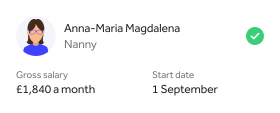
Sign up with quinn online and tell quinn who you employ. quinn needs your employee’s name and contact details, their salary, their working hours and their start date. You enter these details once. quinn uses them to register you as an employer with HMRC and to work out tax, National Insurance and pension for every payday, so you don’t calculate or look anything up. The best time to sign up is two weeks before your employee starts.
Get started
Step 2
quinn does the admin
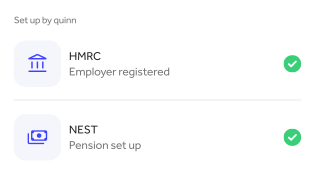
quinn registers you as an employer with HMRC and, where needed, sets up a workplace pension for your employee with NEST. From then on, HMRC and NEST deal with quinn, not with you. quinn handles the letters and emails, the pension questions, sick pay and maternity pay. No forms, no waiting on hold, so you can sit back and relax.
Get started
Step 3
Payroll that runs itself
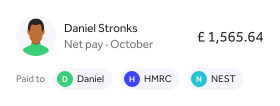
Each month, quinn works out your employee’s pay. It uses the right tax code and calculates all deductions, including tax, National Insurance and pension. You simply pay one monthly amount. quinn runs the payroll and sends the payslips. It pays HMRC and NEST. It can also pay your employee’s salary for you. Does something change, like a pay rise, extra hours, sick leave or a pregnancy? Just let quinn know, and quinn handles it. All documents arrive automatically at the right time. You can sit back and relax.
Get startedWhat quinn handles for you
The registrations, payroll, payments, letters and emails that come with employing someone. All done by quinn.
We handle the authorities
quinn registers you with HMRC, sets up PAYE and enrols your employee in NEST, so you don't fill in applications.
PAYE and payroll
quinn calculates tax, National Insurance and pension contributions, makes the filings with HMRC and sends payslips and P60s.
Payments
You top up one amount each month. quinn then pays HMRC and NEST, and your employee’s salary too if you want.
Letters, emails and deadlines
HMRC, pension letters and emails go to quinn, and quinn keeps track of every deadline and law change.
Sick pay and maternity
quinn works out sick pay and maternity pay, puts it through the payroll and claims the maternity pay back from HMRC. You just send the dates.
What quinn costs
No commitment. No hidden costs. One capped price per employee.
What quinn costs
Example: £1,840 gross pay = £19 + £18.40 = £37.40 a month.
Always included
What you do and what quinn does
You stay the employer: decide who you hire and what you pay. quinn handles the admin for you.
quinn checks the details and sets up the payroll.
From the salary and hours you enter, quinn works out tax, National Insurance and pension for every payday. You don't calculate or look anything up.
quinn does the admin and never becomes the employer.
You choose your employee, agree the pay, hours and duties. quinn handles the administration of the employment on your behalf.
quinn applies the right tax code, the current National Insurance rates and the pension rules. You don’t need to know them.
When they change, for instance in a new tax year, quinn updates the payroll so you stay compliant.
quinn registers you and deals with HMRC and NEST on your behalf.
quinn registers you as an employer with HMRC and sets up your PAYE scheme, or takes over your existing one. Where needed, it sets up a NEST pension and enrols your employee. From then on, HMRC and NEST deal with quinn, so you don’t need to call them, fill in forms or log in to government portals.
quinn handles routine HMRC and pension letters.
Reminders, notices and requests go to quinn, and quinn deals with them in your name. If something needs your input, quinn tells you in plain language.
quinn runs the payroll every month.
quinn calculates gross and net pay, tax, National Insurance and pension, makes the filings with HMRC and sends the payslips to you and your employee. quinn tracks every deadline.
quinn pays your employee on time.
Each month, quinn tells you the exact amount to top up. You make one transfer instead of several, and quinn pays HMRC, NEST and your employee’s take-home pay on time.
quinn handles sick pay and maternity pay.
quinn works out the pay, puts it through the payroll and claims the maternity pay back from HMRC. If HMRC has questions, quinn deals with them.
quinn creates all payroll documents.
That means the payslips, the P60 after each tax year and the P45 when your employee leaves.
quinn checks every change and acts on it.
When you update pay, hours or absences, quinn checks whether anything else has to change and does it. You don't need to know what a change triggers.
Frequently asked questions
quinn does. quinn registers you as an employer with HMRC and sets up your PAYE scheme. You don't fill in any forms or call HMRC yourself.
Where needed, quinn also sets up a NEST pension, assesses your employee's eligibility and manages the enrolment.
The best time to sign up is before your employee's first day, because registration takes at least 2 weeks. You can also sign up up to 4 weeks after the start date. If you already employ someone, quinn takes over your existing PAYE scheme.
You tell quinn about any changes before payday, and quinn does the rest.
quinn calculates gross and net pay, tax, National Insurance and pension contributions, makes the filings with HMRC and sends the payslips.
quinn then tells you exactly how much to top up for the month. quinn tracks every deadline, so nothing is late.
quinn does. You top up one monthly amount, and quinn pays your employee, the taxes and the pension contributions.
That means one top-up from you instead of separate payments to HMRC, NEST and your employee.
If you prefer to pay your employee yourself, you can. quinn still pays HMRC and NEST.
You tell quinn the dates of the absence, and quinn works out the statutory sick pay.
quinn puts it through the payroll and the payslip for that month. If quinn doesn't know your employee's working pattern yet, quinn asks you for it.
You don't need to calculate anything or contact HMRC yourself.
quinn calculates statutory maternity pay and runs the payroll during the leave.
Tell quinn as soon as you know about the pregnancy, and send the MATB1 form from the midwife and the planned start of the leave. quinn does the calculations and claims the maternity pay back from HMRC.
If HMRC has a question, quinn deals with it and only contacts you if it needs something from you.
You let quinn know the new pay or hours, and quinn changes the payroll from the next payday.
quinn also checks what the change means. For example, a pay rise can mean your employee now has to be enrolled in a pension. If so, quinn does it.
You don't need to know what a change triggers. quinn works it out.
quinn runs the final payroll, issues the P45 and tells HMRC.
If you don't hire a replacement, quinn closes your PAYE scheme and informs NEST.
If you hire a new employee, you let quinn know and quinn registers the new employment.
quinn pays HMRC penalties caused by its own errors.
You stay responsible for wages, tax and contributions.
quinn, formerly PAYE for Nannies, is an app-based managed payroll service for UK households. You stay the employer, and quinn does the work with HMRC and NEST. quinn is not payroll software or a nanny agency.
Everything handled. In one place.
From registration to payslips, filings and pensions, quinn does the admin. You stay the employer.
Get started